
Turn your ultrasound into a baby photo
Upload one 3D or 4D scan to create a lifelike AI baby picture.
Upload your ultrasound
Or drag and drop a 3D or 4D ultrasound here
JPG, PNG, WebP · up to 10 MB
See the transformation
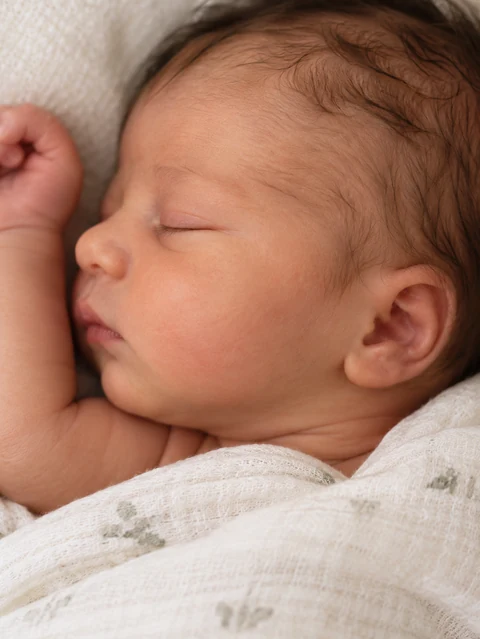
 AI portrait
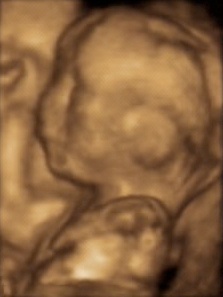 Ultrasound
Drag to compare
About the example
A real public-domain ultrasound by Staecker alongside its AI-generated portrait. This is an artistic interpretation, not a photo of the actual newborn. View source
A first hello,
worth keeping.
AI baby photos, guided by your ultrasound.
BumpBeam is an AI ultrasound to baby photo generator. Start with a clear 3D or 4D scan and create a lifelike newborn portrait to save and share.
A real ultrasound and its AI interpretation—not an actual newborn photo.
Start with the scan.
Add a little of you.
Add up to two optional parent photos for extra visual context, right in the same upload flow.
Add parent photosVisual references, not a genetic prediction.
From scan to portrait,
in three simple steps.
Upload your ultrasound
Start with a clear 3D or 4D ultrasound.
Create the portrait
Guided by visible features and optional parent photos.
Save your keepsake
Download your portrait to keep and share.
Failed generations do not use credits.
What kind of ultrasound works best?
A clear 3D or 4D face
A clearly visible face gives the best results.
Minimal shadows or obstructions
Clearer features lead to better portraits.
JPG, PNG, or WebP · up to 10 MB
Upload a single still image.
Want a polished keepsake from your existing 3D or 4D scan? Read our 8K ultrasound guide.
A little keepsake.
A one-time photo pack.
1, 3, or 10 generations. Starting at $9.99 USD.
- No subscription
- Watermark-free downloads
- 1 remake per order
A few things to know
Can AI turn a 3D or 4D ultrasound into a baby photo?
Yes. BumpBeam uses visible cues from your 3D or 4D ultrasound to create a photographic-style AI baby portrait. Details the scan cannot record, including skin color, hair and lighting, are imagined.
Will the portrait look exactly like my baby?
No, an exact likeness isn’t guaranteed. Your scan guides the portrait, but angle, shadows, and AI interpretation can all affect the result. It’s meant as a keepsake, not a medical image or an exact prediction of your baby’s appearance.
Can I add photos of both parents?
Yes—you can add up to two parent photos alongside your ultrasound. Use clear, unobstructed photos of each parent’s face. Parent photos are optional visual references, and the ultrasound always remains the starting point.
Is there a free way to turn an ultrasound into a baby photo?
There is no always-free generation. BumpBeam sells one-time photo packs, and you need an available generation credit before starting. If a generation fails, the reserved credit is returned so you can try again.
How are my photos handled?
We don’t store your source photos—they’re only sent for AI processing when you generate a portrait. Private results expire after 24 hours and can be deleted anytime before then. Our processing providers may retain data under their own policies. Please review our privacy notice before uploading.
Is this a subscription?
No. Photo packs are one-time purchases with no automatic renewal. Choose from 1, 3, or 10 generations, and sign in with the same Google account anytime to access your balance. Every order also includes one complimentary remake.
A first hello, worth keeping.
Start with the ultrasound you already have.
Create your baby portraitView photo packs